Friday, April 19, 2013

perfume advertisesment


For this advertisement I  first cut out my figure from the original image and then cut out the perfume bottle from the other image. I then added the green wallpaper as the background behind me. To achieve the glow behind me I added an outer glow and increased the glow. For the "live life" I used the bevel & emboss effect as well as the drop shadow. I chose scripty fonts to make it fun and cute and vintage while still sophisticated. I chose the wallpaper background because it blended nicely with my shirt as well as giving it a mature and vintage look, I also chose the bottle because it complimented the green and was eye appealing and vintage. I added a posterize over the entire image as well as a very subtle gradient. and voila.

Monday, April 15, 2013

glamour shot


With this I first added a blur over the layer and then brushed over my face to keep it clear. Then I made a selection around my face and did the inverse and added the vignette around my face. and voila!

Friday, April 12, 2013

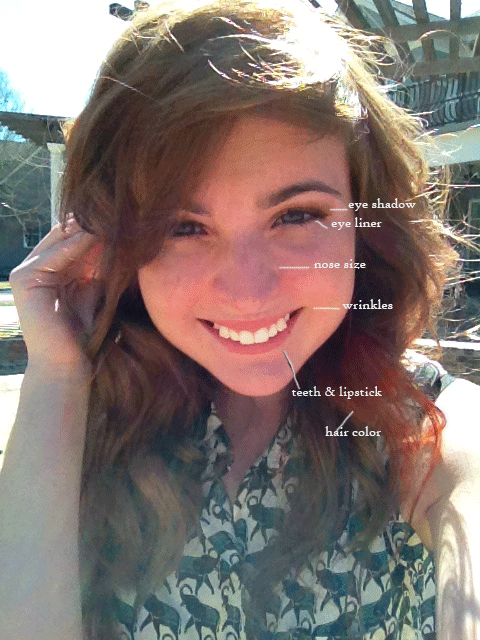
Makeover

I changed my hair color with the quick mask mode and then inverse selection and change color. I whitened my teeth by making a selection around my teeth creating a new layer with it and using the screen mode. I did the eyeliner by simply painting on eyeliner with a light opacity around my eyes. I did the same for the eye shadow. changed my lip color by simply picking a natural darker color of my natural lips and painting that on with an opacity  I got rid of my wrinkles by with the healing brush tool. and voila.

Thursday, April 11, 2013

skin tone

With this I made a selection of the original problem area and the filled it with the color surrounding it in order for it to be even

Wednesday, April 10, 2013

Wrinkle Removal

I used the healing brush tool in order to clone the skin without wrinkles over the skin with wrinkles.

Whiten Teeth

I made a selection of the teeth and copied it into a new layer in screen mode lowering the opacity to give it a whiter effect and then I used curves to make it more natural looking.

Eye Makeup

I used multiple layers in order to create a soft dramatic eye make up. In the first layer I used color mode and colored the eye lid. In the second layer I used soft light and added the purple, and in the third layer I used multiply to do the eyeliner.